
Please note - This feature is only available in New SuiteFiles. Please view this article for a guide on how to access it.
1. When editing a PDF, select the text you wish to redact.
NB: When you arrive to the PDF and select Edit, Pan Mode will be automatically selected. Deselect it by clicking the hand icon once to activate text selection mode.

.png?width=670&height=101&name=image%20(2).png)
2. Click the Redaction button from the pop-up.
.png?width=473&height=150&name=image%20(11).png)
3. Click on the red outlined text you've selected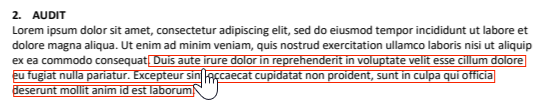
3. Click Apply Redactions
.png?width=315&height=222&name=image%20(12).png)