
Set the signing order
- Start a new signing request and add the documents you need signed.
- Under Recipients, select Add a recipient for each person who needs to sign.
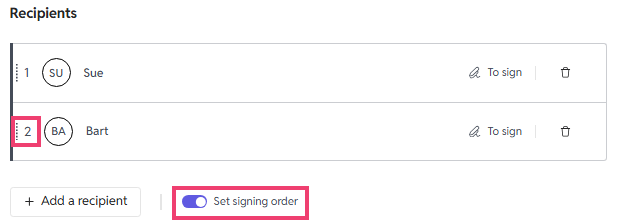
- Turn on Set signing order. A number appears next to each recipient.
- Drag recipients by the handle on the left until they're in the order they should sign. The recipient numbered 1 signs first.
- Continue setting up the request and send it as usual.
What happens after you send
- The first recipient gets their invitation straight away.
- Each following recipient is invited only once the person before them has signed.
- The request details show each signee's status, so you can see who the request is waiting on.
If you don't turn on Set signing order, everyone is invited at the same time and can sign in any order.