
16th September 2026
This release brings a number of Outlook Add-in features and fixes - including for Mac users - along with access to Connect (beta), and a few improvements across the wider platform.
New Outlook Add-in (beta)
-
The number of attachments shown when saving an email is now configurable instead of a fixed limit of 5.
-
You can now attach multiple documents from SuiteFiles at once instead of one at a time.
-
You can now create a new folder directly from the Save Location step when saving an email, without leaving the Outlook Add-in.
-
When email thread tracking is enabled, the Saved to SuiteFiles label is now applied consistently to Sent emails and to Inbox replies.
-
Fixed an issue where a Save to SuiteFiles required message could appear even after an email had already been saved through the Outlook Add-in.
-
When a user saves an attachment via the Outlook Add-in to a folder that already contains a file (document) with the same name, the new document will now adopt the same convention as used by the Doc Store when duplicating files e.g. Hello (1).docx instead of Hello 1.docx.
-
Fixed an issue where the breadcrumb sometimes showed the wrong location.
-
Clicking “Log out” in the add-in now properly ends your session, rather than leaving you signed in behind the scenes.
Improved Outlook Add-In usability on Mac
-
The Save to SuiteFiles ribbon button was missing in the new Outlook for Mac app. This now displays correctly.
-
Fixed an error that could appear when saving a file or creating a folder through the add-in on Mac in Safari.
-
Resolved issue where some text was displayed in the wrong font on Mac.
-
The Outlook Add-in on Mac was signing users out roughly every 15 minutes. Sessions now stay signed in as expected.
Connect (beta)
A small number of customers are working with us on a beta version of new Connect, helping with testing and reviewing the functionality. Watch this space for when this is available for general release!
-
SuiteFiles Administrators can now access Admin Settings > Connect to see a short explanation of what Connect does and a link to a step-by-step help article on how to enable Connect for their organisation. Only a Microsoft 365 Global Administrator or Privileged Role Administrator can execute the consent process by selecting Enable Connect, or the SuiteFiles Administrator can Copy Link to send to the Microsoft 365 Global Administrator or Privileged Role Administrator.
-
To learn more: Enabling Connect in your Microsoft 365 tenant
-
When uploading a file to a Shared Location request, SuiteFiles users can now choose to Upload from SuiteFiles or From Own Device.
Document Signing Fixes
-
Fixed an issue where signing reminders weren't being sent.
-
Fixed an issue where recipients’ signature had to be redrawn for each signature field in a document pack.
Improvements in New SuiteFiles
-
A mandatory field has been added to the Billing Details screen to enter a tax number (ABN, GST, VAT, or your local equivalent). If this has not been entered before, you will need to enter it the next time you update your billing details.
-
An issue has been fixed that could cause new SuiteFiles to get stuck on a loading screen after signing in.
-
Markdown files (.md and .markdown) can now be downloaded from both new SuiteFiles and the Outlook add-in, the same as other file types such as PDF and Word.
9th September 2026
This release brings a set of improvements across Document Signing, the closed Beta version of Connect and the wider platform.
A small number of customers are working with us on a beta version of new Connect, helping with testing and reviewing the functionality. Watch this space for when this is available for general release!
Document Signing
We’ve included several fixes plus some new features for document signing.
Improvements to document signing packs
-
You can now sort on the “Last modified” column when adding documents to a signing request, so the file you worked on most recently is easy to find.
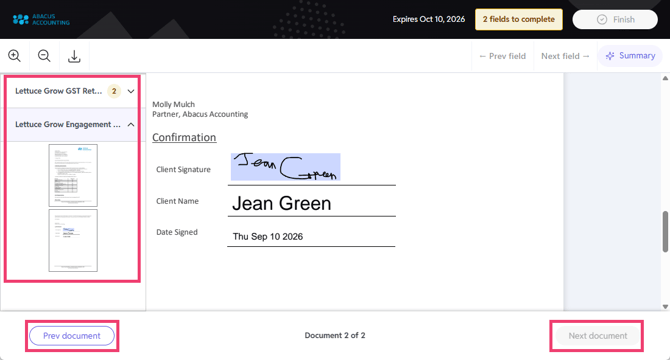
- Recipients will now see an overview of every document in the pack on the left-hand pane and buttons at the bottom to move between documents.
-
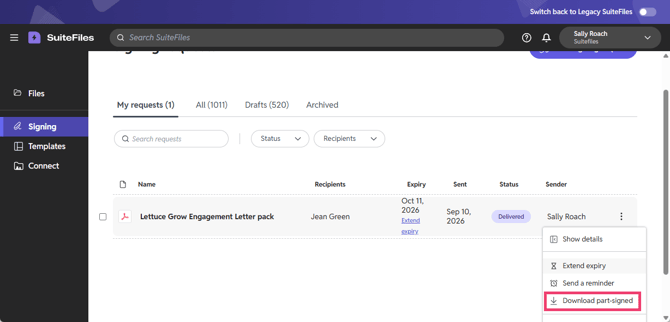
Signing administrators can now download a part-signed pack straight from the signing dashboard at any point before everyone has signed.
-
Fixed an error where a recipient's signature field could occasionally stop responding when completing a signing request.
-
Fixed and issue where the “Finish” button could become unresponsive after signing all fields in a document signing pack if a large document hadn't fully finished loading.
-
Fixed an issue where the “Signing” option could disappear from the left-hand menu after sending a signing request, until logging out and back in.
Platform Improvements
-
A new feature has been added to the right-click menu for files and folders, providing the option to “Open in new tab”.
-
SuiteFiles Administrators could intermittently lose the Admin Settings option on the Signing and Templates screens after refreshing the browser. This is now fixed.
12 August 2026
New Document Signing improvements
We've shipped a round of fixes to make document signing more reliable, for both senders and recipients.
-
Clearer messaging when a file is no longer available. If a signing request can no longer be completed because the source file was removed, recipients now see a clear message letting them know the request is unavailable, instead of a blank screen.
- Fixed an error some recipients hit completing signing on mobile. We've resolved an issue that occasionally prevented recipients from finishing a signing request on certain mobile devices.
- Required fields are now properly enforced. Recipients can no longer submit a signed document while required fields are left blank. Any outstanding fields are now clearly indicated before submission is allowed.
Billing updates
-
Billing has moved. If you need to update your credit card details, a SuiteFiles Administrator or those with Manage Billing access can do so in the new billing platform in New SuiteFiles. For steps, see Updating your credit card. If you have problems accessing the new platform, or have questions, please contact our support team using the Contact Support option at the top of this page.
Sign-in improvements
-
Skip the email step on your own device. You can now choose to have SuiteFiles remember your email on a device you regularly use, so you go straight to your password instead of re-entering your email each time. This is optional and can be turned off at any time using “Not you? Use a different account.”
-
Smoother sign-out. We've also fixed an issue where signing out didn't fully complete for some users, which could leave them looped back into the app instead of properly signed out.
15 July 2026
New Document signing
-
Custom expiry date picker: Signing requests now use a flexible date picker instead of fixed 30, 60, or 90 day options. The expiry date defaults to 30 days from preparation but can be set to any date up to a year out.
New Outlook Add-in
-
New: Smart folder suggestions: The add-in can now suggest one to three save locations when you open the save panel, based on the sender and your previous save history. You can accept a suggestion or search and browse as normal.
-
Please note: this is a first version of this feature. Suggestions will improve over time as we learn more about save patterns.
PDF Editing
- Fixed: PDF redaction could appear applied outside edit mode: Selecting text and clicking Redact outside of Edit mode showed a red outline without a way to apply it, which was confusing. Redaction now behaves consistently with the rest of the PDF editing tools.
-
Fixed: Bookmarks could not be saved without an unrelated edit: Adding a bookmark to a PDF did not enable the Save button on its own, a second, unrelated edit was needed first. Bookmarks can now be saved on their own.
Smart Templates
Please note: Smart Templates remain available to select customers only.
- Fixed: Blank preview after rejecting the first AI prompt: Rejecting the very first prompt in the template chatbot left the document preview blank with no explanation. It now shows a clear "Empty document" message.
-
Fixed: No loading indicator while searching for contacts: The contact search field in the template mapping step appeared unresponsive while results were loading. A loading indicator now shows while the search is in progress.
General Improvements
- Fixed: Document preview not updating after an AI response: In some chat sessions, the document preview panel did not refresh after the AI finished responding. This has been resolved.
-
Loading indicators added across more screens: Screens that previously appeared blank or static while data loaded (including the Template Library, File, and Document Signing pages) now show a loading indicator.
10 June 2026
We've made the following updates in New SuiteFiles:
Authentication & Sessions
-
Concurrent sessions: Users can now be logged into the SuiteFiles Web App and the New Outlook add-in (Beta) simultaneously. This means you can work seamlessly across both platforms.
Smart Templates
Available to select customers only
- Integration contact data mapping fix: resolved the "Dear" prefix duplication
- Consistent variable mapping across users: templates with the same data no longer produce different results for different users
- Organizational constants fix: these values now correctly populate when filling a template
- Template name uniqueness check: duplicating a template now shows an "Item already exists" modal with Keep both and Rename options
- Rich markdown editing experience: templates now support a richer markdown editing experience
- Template creation improvements: styled DOCX generation, style document picker, default style document, and end-to-end style integration
Navigation
- Default sort order fix: the file list now defaults to name ascending on initial load
- Loading indicator: a loading visual now shows when fetching more folders/files
- Save to modal fix: no longer opens blank on first use
- Upload size increase: We've increased the maximum file size you can upload directly to New SuiteFiles from 250 MB to 1 GB, making it easier to work with larger files.
Improved Contact Display (New Document Signing & Smart Templates)
- When looking up contacts from external systems (XPM, Karbon, MYOB, IRIS), we’ve replaced the logos with the integration name, providing a clear indicator showing where each contact came from, making it much easier to view cross-system data. This update applies to New SuiteFiles only.
New Document Signing
- AI document summary fix: the summary no longer spins indefinitely.
New Outlook Add-in (Beta)
- Error toast fix: toasts no longer auto-dismiss
- Add-in retitled to "SuiteFiles for Outlook Add-in" consistently across all surfaces
- Enhancements: Bulk Save of emails, and the ability to mark folders as Favourites
20 May 2026
We've made the following updates in New SuiteFiles:
Smart Templates
- Organizational constants now populate properly when filling templates
General updates and bug fixes
- Resolved a token refresh issue where users were logged out of New SuiteFiles every 5 minutes
13 May 2026
We've made the following updates in New SuiteFiles:
Smart Templates
Templates are now available to select customers. Create documents from reusable templates with AI-assisted placeholder mapping. Smart Templates include:
- Template library with custom categorization
- Role-based admin controls for template management
- An editing experience for existing templates
- AI-driven flow that automatically suggests placeholders based on your integrated data
Please note: This update is only available to some early access users. We’ll roll this out to further customers as more features are available.
New Integration: IRIS Client Data
Connect your IRIS system to SuiteFiles and automatically map client and contact information into your templates and documents. Admins can request the connection in Settings > Integrations in New SuiteFiles only.
New Integration: MYOB Client Data
You can now import MYOB client and contact data into SuiteFiles for use in templates and document workflows. This is available to customers with MYOB subscriptions. Admins can request the connection in Settings > Integrations in New SuiteFiles only.
Authentication & User Onboarding Updates
- Multi-factor authentication (MFA) is now available for added security during login
- Streamlined onboarding experience for new team members
- Support for both authenticator app and SMS-based verification
25 April 2026
New Outlook Add-in (Beta)
- Better handling of saving items to the root folder
- Thread-tracking option on the Save & Send page when composing a new email
- Folder information when searching, and other search improvements
- Improved thread-tracking visualization and management on the Settings page
Please note: This update is only available to some early access users. Once Beta is completed, the New Outlook Add-in will be available in the Microsoft store. We’ll provide an update once this is live.
And, we've made the following updates in New SuiteFiles:
New User Registration
- Introduced MFA with SMS and Authenticator
General updates and bug fixes
- Can see full details of each Space via a tooltip
- Better handling of folder naming when creating a new folder
15 April 2026
Templates with AI Assistance (Coming Soon)
We're building an intelligent template system that will help you create documents faster. Templates will include AI-powered suggestions for how to fill placeholders, support for custom document editors, and the ability to upload reference documents for the AI to learn from.
Admin Settings Enhancements (New SuiteFiles)
Admins now have expanded control over their New SuiteFiles (Beta) environment:
- Manage team members and their permissions in one place
- Customize branding settings for your organization
- Set up organizational constants that auto-populate across the new Smart Templates
Please note: This update is only available to some early access users. We’ll roll this out to further customers as more features are available.
New Outlook Add-in (Beta)
We now have an updated Beta version of the New Outlook add-in, including tracking email threads, helping you keep conversations organized when saving emails to SuiteFiles.
Additional UI improvements make it easier to manage attachments and find files directly from Outlook.
- Complete folder listing
- Default folder location is now the Clients folder, rather than Home
- Save page includes a better folder search and selection for Save Location
- Less requirement to login (token is cached longer)
- Site selection is remembered
- Email and attachment saving improvements (selected/not selected)
- Thread-tracking is an option. However, this part is still in beta.
- The threads you track have cards on the Settings page but more detail will be added to these, and the option to delete a tracked thread.
- This is now track based on the ID of the email, so even if you change the recipients or the subject, it should remain tracked until you delete it.
Please note: This update is only available to some early access users. Once Beta is completed, the New Outlook Add-in will be available in the Microsoft store. We’ll provide an update once this is live.
Streamlined Login and Onboarding (New SuiteFiles)
We've introduced a new login experience and made it easier for new team members to get set up in SuiteFiles with a smoother onboarding flow.
Existing SuiteFiles users need to enter their email address, and if prompted on the next screen, select Sign in with Microsoft. Existing customers do not need to register for a new account.
Please note: This update is only available to some early access users. We’ll roll this out to further customers as more features are available e.g. the ability to connect a Space. For now, Super Suite customers can switch to New SuiteFiles by using the ‘Switch to SuiteFiles Beta’ toggle in the top right corner of the SuiteFiles Web App.
25 March 2026
We released a performance optimization fix for updating XPM client and contact information in the Legacy platform.
16 March 2026
Custom Branding in New Signing
Custom Branding is now available in new signing, for those with access to the SuiteFiles Beta. To enable custom branding, a SuiteFiles Admin can follow these steps.
New Outlook add-in Beta
This is the first step in providing full compatibility with the new Outlook and a better experience in the web-based Outlook. If you'd like to register your interest to participate in the Beta and provide feedback, please complete this form and we'll be in touch.
Updates to New SuiteFiles
- We've made some further updates to the SuiteFiles Beta
- You can now edit your first and last name used on outgoing document signing emails. You can find this setting under your User Profile in SuiteFiles Beta. Once saved, the changes will filter through onto any document you send via New signing.
- You can now multi-select folders and files to Move or Copy in bulk
- You can view more Details on a file or folder.
28 January 2026
Introducing the New SuiteFiles!
We’ve been hard at work behind the scenes on a next-generation SuiteFiles experience that’s faster, smarter, and built to support what’s coming next. This new platform lays the groundwork for bigger, better improvements, and we’re excited to share an early access first look.
Features in New SuiteFiles include:
-
PDF redaction
-
PDF content editing
Use the toggle in the top right corner of the SuiteFiles Web App to try the fresh new view for yourself.
We have comprehensive guides on how to get around in the New SuiteFiles here plus all your questions answered in our FAQ for New SuiteFiles.
New Signing Updates
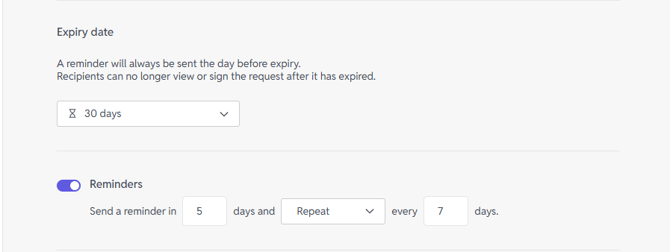
Automatic reminders are now live.
When sending a document for signing, you can now set up automatic reminders to help keep things moving and ensure recipients complete their tasks on time. You can choose whether reminders repeat, and how often they’re sent.
Learn more here.
Email and status tracking
Stay on top of your signing requests with at-a-glance tracking, so you can quickly see who has received their email, viewed the document, and completed signing.
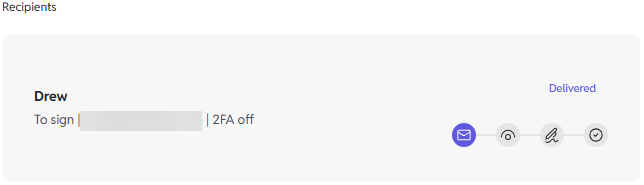
Please note: This feature is currently available under the Show details panel, accessed via the new signing dashboard.
Learn more here.